


OzarksFirst
3.9116.00 Reviews
App Specs
- Version
- 510.0.1
- Updated On
- License
- Free
- Downloads
- 10,000+
- Developer
- Nexstar Inc.
- Categories
- News & Magazines
- Platform
- Android
Screenshots
 Analysis by AppCompare
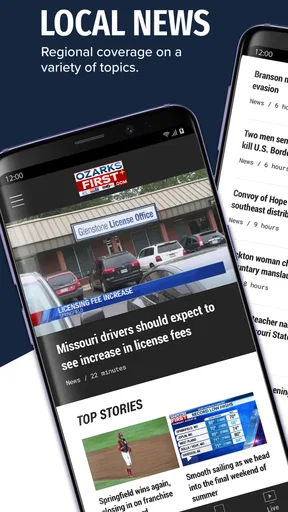
I use local news apps differently from national news apps: I open them when I need to know what is happening close to home, not when I want a broad overview of the entire country. OzarksFirst fits that purpose. It is a free News & Magazines app from Nexstar Inc. focused on OzarksFirst.com local news, weather, sports, and videos for the Ozarks. After spending time with it, I see its main strength clearly: it puts regional information in one place without asking me to pay before I can try it.
That focus is also the first thing to understand before installing it. This is not a general-purpose news reader, and it is not designed to replace every source I use. Its usefulness depends heavily on whether the Ozarks is the area I care about. For someone living there, visiting, commuting through the region, or following local teams and weather, the narrow coverage is a benefit. For someone looking for international reporting or a customizable multi-publication feed, the app is a less natural fit.
What I found inside the local news experience
I found the most useful way to judge this app is to ask what I need from a local check-in: a quick regional overview, or a detail that could change my plans. I’d use its mix of reporting, weather, sports, and video to spot what deserves a closer look, then choose the right format for the moment. That practical routine also makes its limits easier to weigh.
A regional app with a practical mix of coverage
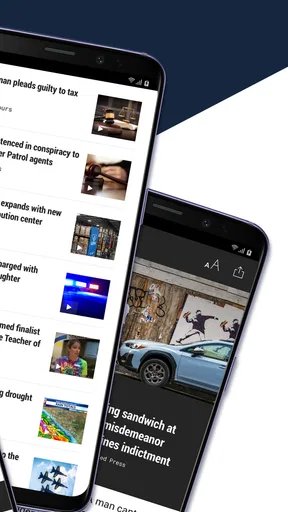
The app brings together several kinds of information that I normally have to collect from separate places: local news stories, weather updates, sports coverage, and video content. That combination makes sense for everyday checking. I might open it in the morning for a quick look at overnight developments, return before leaving work to check weather, and use it later for a local sports story or video.
I like that the focus is not limited to one narrow subject. A weather-only app can tell me about conditions, while a national news app can bury a nearby road issue under headlines from far away. OzarksFirst is more useful when I want a regional snapshot. The trade-off is that the app’s value comes from relevance rather than breadth. If the Ozarks is not part of my daily life, much of that local emphasis becomes background noise.
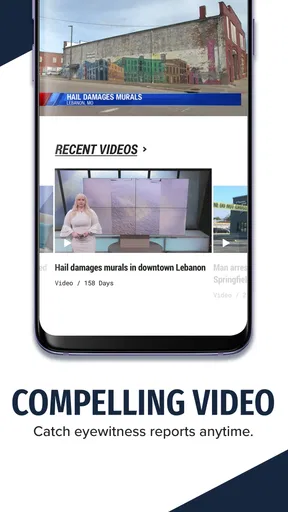
The presence of video is another practical distinction. Some local stories are easier to understand when I can watch a report rather than read a short text update. At the same time, video is not always the best option when I am in a hurry, using mobile data, or checking information quietly in a public place. I treat the video section as an additional way to follow coverage, not as a reason to ignore the written articles.
How I would use it during a normal day
A realistic routine would be simple. Before heading out, I would scan the latest local headlines and weather coverage. If conditions look uncertain, I would use the app as an early warning that something in the region deserves closer attention, then decide whether I need more detailed planning. Around lunchtime, I might check sports or watch a local clip. In the evening, I would return for developments that occurred during the day.
Worth Reading Before You Choose

EA SPORTS FC Mobile 26 Is a Bigger Football Game, but It Takes Time

Flipboard Shows What News Apps Must Do Beyond the Feed

Switching to Android Auto Means Rethinking Your Driving Routine

Google Calendar Makes a Crowded Week Easier to Manage

Ludo King Makes the Most of the Minutes Between Plans

Baby Panda World Brings Quick Play to Modern Phones, but Its Game Library Feels Busy
This workflow works because the app is regional rather than overwhelming. I do not have to sort through a long list of unrelated national stories before reaching something relevant to my surroundings. The limitation is that I would not rely on one news app alone for major decisions. For severe weather, travel disruptions, or fast-changing events, I prefer comparing the app’s coverage with official local notices and other trusted sources.
What the app’s audience size suggests
OzarksFirst has an average rating of 3.9 from 372 ratings, with 116 written reviews, and it has passed 10K+ installs. Those figures suggest a modest but established audience rather than a huge national platform. I would not interpret that as a quality guarantee, but it does help set expectations: this feels like a regional utility built around a defined community, not a massive social news network with endless personalization.
The app was released on May 29, 2013, and its current version is 510.0.1. That long presence is useful context because local apps need continuity; people are more likely to return to a service that has been around for years. Still, an older release history does not automatically mean every screen will feel modern. My advice is to judge it by how quickly it gets me to current local information, not by expecting the same polish as a major national platform.
Cost is straightforward, and that matters
OzarksFirst is free. That makes the decision easy for a curious reader: I can install it and decide whether the local coverage fits my routine without committing money. There is no paid purchase to weigh against the amount of news I consume, so the value question is mainly about time, relevance, and convenience.
I appreciate that distinction because local news services are often judged unfairly against broad platforms that offer a much larger range of topics. A free regional app does not need to replace every source to be worthwhile. If it saves me from repeatedly searching for Ozarks weather, sports, and nearby reporting, it can earn a place on my phone simply by being convenient.
At the same time, free access does not mean unlimited value for everyone. Someone outside the coverage area may install it, browse briefly, and discover that the regional focus is not useful enough to justify another app. I would therefore describe it as free to access, but valuable mainly when its local focus matches your location or interests.
Where it fits beside usual alternatives
Compared with a national news app, this one gives me a tighter local lens. National services are better when I want politics, business, world events, or a broad mix of publishers. They may also provide more sophisticated topic controls. OzarksFirst is better when the question is, “What is happening around the Ozarks?” rather than, “What is happening everywhere?”
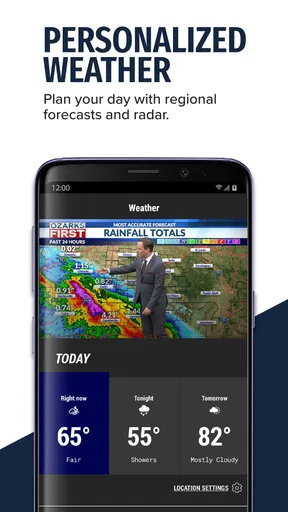
Compared with a dedicated weather app, it offers less reason to expect a highly specialized forecasting experience. Its advantage is that weather sits alongside local reporting, sports, and video. I can get context around a weather-related story instead of opening a separate service for every category. If minute-by-minute radar, detailed forecasts, or advanced alerts are my priority, a dedicated weather tool may remain the better companion.
Compared with visiting OzarksFirst.com in a browser, the app is more convenient for repeated mobile checks because it keeps the publication close at hand. A browser may be preferable when I am using a computer, comparing several sources, or trying to limit the number of installed apps. The choice is less about which format is universally superior and more about whether I want quick access from a phone.
Small habits that make the app more useful
My first tip is to use it as a short, repeated check rather than trying to read everything in one sitting. Local information changes throughout the day, and a brief morning scan followed by another look later is more practical than treating the app like a long magazine issue. This also helps me separate genuinely relevant updates from stories I only opened because the headline caught my attention.
My second tip is to keep the sections mentally separate. I do not treat a sports item, a weather report, and a local news article as interchangeable. When I need to make a decision, I first identify what kind of information I am reading and whether it answers my question. That habit is especially useful when a video gives a quick overview but I need the written details to understand the situation fully.
My third tip is to use the app as a starting point during developing events, not as my only verification step. I might discover a local issue through its news or video coverage, then check an official source if the information affects travel, safety, school plans, or an appointment. This is not a criticism unique to OzarksFirst; it is simply a sensible way to use any single local news feed.
Friction I would want new users to expect
The biggest limitation is geographic. The app’s identity is tied to the Ozarks, so its narrow scope can feel restrictive to anyone who wants a wider news diet. Even a strong local report will not compensate for that mismatch. I would skip it if I mainly need national headlines, international coverage, or a single feed that combines many regions.
Another trade-off is format. Videos can be engaging, but they are less convenient than text when I am on a weak connection, trying to conserve battery, or checking a headline quickly. The presence of video adds useful depth, but it can also make the experience feel less efficient for readers who want only compact written updates.
The average rating of 3.9 indicates a generally mixed-to-positive reception rather than universal approval. I read that as a reminder to keep expectations realistic. A regional app can be highly useful for one person and only occasionally useful for another, depending on location, preferred format, and how often local updates matter. The rating does not tell me exactly which experience I will have, but it supports a balanced view rather than an assumption of perfection.
Compatibility and audience considerations
The app requires Android 7.0 or later, which makes it accessible to many Android users while still excluding devices that have remained on much older software. I would check the operating system before planning around it, particularly if I am installing it on an older spare phone. The listed content rating is Everyone 10+, so families should still use ordinary judgment about which news stories or videos younger readers encounter.
Because it is a news app, the most important personal question is not whether it has every possible feature. It is whether the local coverage matches my daily information needs. A resident who wants regional headlines, weather, sports, and video in one mobile destination has a clear reason to try it. A reader who expects extensive customization, a national perspective, or a specialized forecast tool should probably pair it with other apps or choose a different primary source.
Who gets the most value from it
I would recommend OzarksFirst to people who live in the Ozarks and want a quick way to stay connected to nearby events. It also makes sense for former residents who still follow local sports or regional developments, and for visitors who want a local perspective during a stay. The free price lowers the barrier, so there is little downside to testing whether the coverage fits.
It is particularly useful for someone who dislikes maintaining separate apps for local news and local video. The combination gives me a more complete regional routine: read when I need speed, watch when a report benefits from visual explanation, and check sports or weather without switching to a national feed. That convenience is the app’s strongest practical argument.
I would skip it as my main news source if I rarely care about the Ozarks, if I want international reporting, or if my priority is technical weather analysis. I would also look elsewhere if I need a highly personalized feed that learns from a wide range of publishers. In those cases, the app’s focused coverage is not a strength; it is the reason it will feel limited.
My verdict after weighing the trade-offs
OzarksFirst delivers a sensible free local-news package for the audience it is built to serve. I value the combination of regional reporting, weather, sports, and videos because it supports several everyday checks without forcing me into a broad national feed. Its long-running presence, current version 510.0.1, and modest but established audience give it the feel of a practical community-focused app rather than an experimental download.
I would not install it expecting a complete replacement for national news, a dedicated weather service, or official emergency information. That would be asking it to do a different job. I would install it if I wanted the Ozarks close at hand and preferred a free, focused way to check local stories throughout the day.
My final recommendation is conditional but positive: try OzarksFirst if regional relevance matters more to you than broad coverage. For the right reader, it can become a useful first stop each morning and a convenient way to return to local updates later. For everyone else, a wider news app or specialist weather service will likely provide better value, even though this one costs nothing to try.
In short, OzarksFirst succeeds by staying close to its audience. I see it as a companion app for local awareness, not an all-purpose news command center. If that distinction matches what I need, the free download is easy to justify; if it does not, the app’s narrow regional mission will be more noticeable than its convenience.
Pros
- Fast access to breaking news and local updates from the Ozarks.
- Live weather forecasts and alerts help users prepare for changing conditions.
- Covers local sports
- events
- and community stories in one app.
- Video reports provide more context than short text headlines.
- Simple layout makes recent stories easy to browse on mobile devices.
Cons
- Coverage is mainly focused on the Ozarks and may feel limited elsewhere.
- Frequent breaking-news alerts can become distracting without adjustment.
- Some stories may take time to load on slower mobile connections.
- Advertising can interrupt browsing and reduce the reading experience.
- Certain features or content may depend on an active internet connection.
FAQs for OzarksFirst
What is OzarksFirst?
OzarksFirst is a local news and weather app focused on the Ozarks region. It provides access to breaking news, community stories, weather forecasts, severe weather updates, videos, and other coverage from the station’s newsroom. The app is designed for people who want a convenient way to follow local events and stay informed while traveling or away from a television.
What type of news and information can I find in the OzarksFirst app?
The app typically includes local and regional news covering topics such as crime, public safety, politics, education, health, business, entertainment, and community events. Users may also find live or recorded video reports, news alerts, featured stories, and updates from the OzarksFirst team. Available sections and content can change depending on current events and newsroom coverage.
Does OzarksFirst provide weather forecasts and severe weather alerts?
Yes, weather is one of the main features of OzarksFirst. Users can generally view current conditions, hourly information, extended forecasts, radar imagery, and video updates from meteorologists. Depending on location permissions and notification settings, the app may also deliver severe weather warnings or important local alerts. Always confirm emergency information through official authorities when necessary.
Is the OzarksFirst app free to download and use?
OzarksFirst is generally available as a free download for supported Android and iOS devices. Most news stories, weather information, videos, and alerts can be accessed without a subscription, although the app may contain advertising. Mobile data charges may apply when streaming videos, loading images, or receiving updates over a cellular connection instead of Wi-Fi.
Does OzarksFirst require my location or notification permissions?
Location access is usually optional, but allowing it can help the app display weather conditions, forecasts, and alerts relevant to your area. Notification permission is also optional and controls whether you receive breaking news, weather warnings, and other updates. You can review or change these permissions at any time through your Android or iOS device settings.


